Line Chart Race Maker
Create a line chart race online, also called a racing line chart or line chart race generator. No video editor or coding needed. Import time-series data from Excel or Google Sheets and export as MP4, PNG, or JPEG. Free to start.
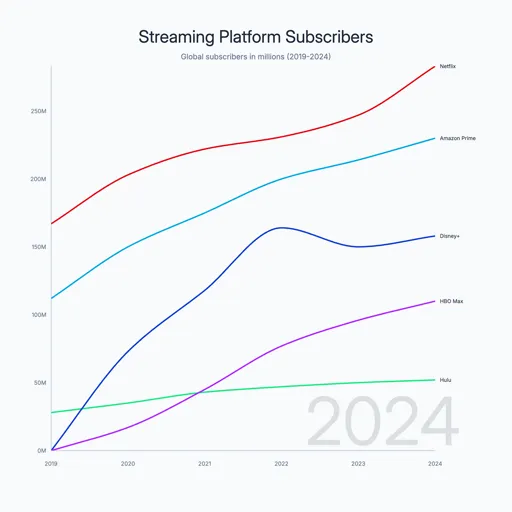
Line chart race video ideas
- GDP growth by country over decades
- Population growth by country or city
- YouTube subscriber count by channel over time
- App monthly active users (TikTok, Instagram, Facebook)
- Stock market indices (S&P 500, Nasdaq, FTSE 100)
- Streaming platform subscribers (Netflix, Disney+, HBO Max)
- Company revenue over time
- Rent costs by city over time
- Billionaires net worth
How to create a line chart race video
- Choose a template - Browse line chart race templates and pick one that fits your data — streaming subscribers, revenue growth, market trends, or start from scratch.
- Paste your data - Copy time-series data from Excel or Google Sheets and paste it in. Each row is a time point; each column is a category.
- Customize style - Adjust line colors, labels, title, font, and animation speed. Every element is editable.
- Export and post - Set your canvas size for the platform — vertical for TikTok and Reels, landscape for YouTube. Export as MP4.
Where to get data for a line chart race
Our World in Data - Free, citable datasets on population, energy, health, and economic trends. Most tables are downloadable as CSV.
Statista - Subscriber counts, monthly active users, revenue over time, and market share. Free tier covers most popular charts.
Google Trends - Search interest over time for any keyword, brand, or topic. Export as CSV — works well for brand or platform comparison races.
Company investor relations pages - Quarterly earnings reports often include revenue, user, or subscriber figures going back years. Free and authoritative.
Wikipedia - Historical tables for population, revenue, and rankings. Copy the table and paste directly into AECharts.
Kaggle - Pre-compiled datasets across every topic. Search for your subject + 'historical' and you'll usually find something ready to use.
Line chart race FAQ
Make your line chart race video
Export MP4 for TikTok, Reels, YouTube Shorts, or LinkedIn. No video editor needed.
Related