Line Chart Race Maker
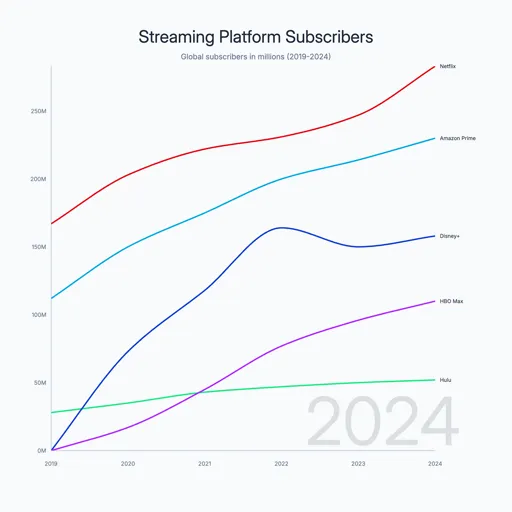
Create animated line chart race videos that show values competing over time. Watch multiple lines grow, cross, and overtake each other with smooth animation. Ideal for subscriber growth, revenue trends, market share shifts, and any data where trajectory tells the story.
Why Use a Line Chart Race?
Show Momentum and Trajectory
Line races reveal not just who is winning but how fast they are climbing. A line curving steeply upward tells a story no static chart can match — you see acceleration, stalls, and comebacks in real time.
Engaging for Long Time Spans
When your data spans years or decades, line races compress the timeline into a gripping animation. Viewers stay engaged through the full story rather than scanning a cluttered static chart.
Ideal for Continuous Data
Line charts suit data that flows continuously — subscriber counts, stock prices, revenue, temperature. The connected line makes trends intuitive in a way bars cannot.
Popular Use Cases
Streaming platform subscribers, social media follower growth, company revenue over time, stock price comparisons, population trends, and app download milestones.
How to Create a Line Chart Race Video
Four steps from raw data to finished MP4:
Choose a template
Browse line chart race templates and pick one that fits your data — streaming subscribers, revenue growth, market trends, or start from scratch.
Paste your data
Copy time-series data from Excel or Google Sheets and paste it in. Each row is a time point; each column is a category. AECharts formats it automatically.
Customize style
Adjust line colors, labels, title, font, and animation speed. Every element is editable — match your brand or use a clean default.
Preview & export
Watch the race animation in real-time. When it looks right, export as MP4. Download and share on YouTube, LinkedIn, or anywhere.
Related
- Bar Chart Race Template — create animated racing bar charts that show rankings over time
- Animated Charts for YouTube Videos — tips for using chart animations in video content
Create Your Line Chart Race Video
Paste your time-series data, pick a template, and export as MP4 in seconds. No video editing software needed.