Export Charts as MP4 Videos - Free Chart to Video Converter
Transform your animated charts into professional HD video files instantly. No After Effects, no complex software, no uploads required. Just create your chart, click export, and download your MP4 video in seconds. Perfect for Instagram Reels, TikTok, YouTube Shorts, LinkedIn posts, and presentations.
Watch how AECharts lets you export professional animated chart videos in just one click. From data to downloadable MP4 in seconds.
Video Export Specifications
Our chart to video converter produces broadcast-quality MP4 files optimized for social media and professional use. Every export uses industry-standard encoding for maximum compatibility.
| Specification | Details |
|---|---|
| Format | MP4 (H.264 codec) |
| Resolution | 1080p (1920x1080 Full HD) |
| Frame Rate | 60fps (butter-smooth animations) |
| File Size | ~2-5MB per second of animation |
| Audio | Silent (music/narration coming soon) |
| Duration | Customizable (1-60 seconds typical) |
| Export Speed | 5-15 seconds (hardware accelerated) |
| Privacy | 100% browser-based, no uploads |
Export Charts for Any Platform
Our MP4 exports are optimized for every major social media platform and presentation tool. Here's how to get the best results for each platform:
Instagram Reels & Stories
For Instagram, use vertical format templates (9:16 aspect ratio). Export at 1080x1920 for optimal display. Keep animations under 15 seconds for Reels, or 60 seconds for feed posts. Bright colors and bold text perform best on mobile feeds.
TikTok
TikTok videos work best at vertical 9:16 ratio. Use high contrast colors and large text for mobile viewing. Keep chart animations punchy (3-10 seconds) to maintain attention. Export at maximum quality for TikTok's compression algorithm.
YouTube Shorts
YouTube Shorts require vertical 9:16 format and can be up to 60 seconds. Our 1080p exports maintain quality through YouTube's processing. Add text overlays and use attention-grabbing animations in the first 3 seconds to boost retention.
LinkedIn works best with square (1:1) or horizontal (16:9) formats. Professional color schemes and clear data labels perform well. Export charts highlighting business metrics, growth trends, or market analysis. Native video uploads get more engagement than links.
PowerPoint & Keynote
For presentations, export in horizontal 16:9 format matching your slides. Simply drag and drop the MP4 file into your presentation. Videos auto-play during slideshow mode. Use slower animations (10-15 seconds) for audience comprehension.
Twitter/X
Twitter supports MP4 up to 512MB and 2:20 duration. Square (1:1) format works well in feeds. Keep file sizes under 15MB for faster loading. Bold, eye-catching animations stop the scroll. Export with high contrast for mobile visibility.
Everything You Need for Professional Chart Video Exports
Instant MP4 Export
One-click video export with no rendering queues or processing delays. Your chart animates, you click export, and your HD MP4 downloads immediately. No account required for testing, unlimited exports on Pro.
HD Quality Output
Export at Full HD 1080p resolution with 60fps for ultra-smooth animations. Professional quality suitable for broadcast, client presentations, and premium social media content. Crisp text and vibrant colors on any screen.
No Watermarks (Pro)
Pro plan members get completely clean exports with zero watermarks or branding. Perfect for client work, commercial projects, and professional presentations. Your brand, your content, our technology.
Fast Encoding
Browser-native VideoEncoder API leverages your device's hardware acceleration for lightning-fast exports. No server uploads means your data stays private and exports complete in seconds, not minutes.
Real-time Preview
What you see is exactly what you export. Preview your chart animations in real-time before exporting to ensure perfect timing, colors, and layout. No surprises, no re-rendering needed.
Custom Durations
Control animation speed and video length to match your needs. Create snappy 3-second social clips or detailed 30-second data stories. Adjust timing for each element independently for perfect pacing.
Optimized File Sizes
H.264 codec delivers maximum quality at minimal file sizes. Typical 10-second animations export at 20-50MB, perfect for fast uploads and sharing. Professional compression without visible quality loss.
Universal Compatibility
MP4 format works everywhere: Instagram, TikTok, YouTube, LinkedIn, Twitter, PowerPoint, Keynote, iMovie, Adobe Premiere, and more. One export, infinite platforms. No conversion or reformatting needed.
Free vs Pro Video Exports
Compare export capabilities across our plans. Start free to test all features with image exports, then upgrade to Pro for unlimited HD video downloads.
| Feature | Free Plan | Pro Plan |
|---|---|---|
| Image Export (PNG) | ✓ Unlimited | ✓ Unlimited |
| Video Export (MP4) | ✗ | ✓ Unlimited |
| Resolution | 1080p (images) | 1080p, 60fps |
| Watermark | N/A | None |
| Export Speed | Instant | Instant |
| File Size Limit | Unlimited | Unlimited |
| Commercial Use | ✗ | ✓ Allowed |
| Price | $0/month | $12/month (annual) |
How to Export Your Chart as MP4 Video
Exporting animated charts as video is incredibly simple with AECharts. Follow these four steps to create professional chart videos ready for social media and presentations:
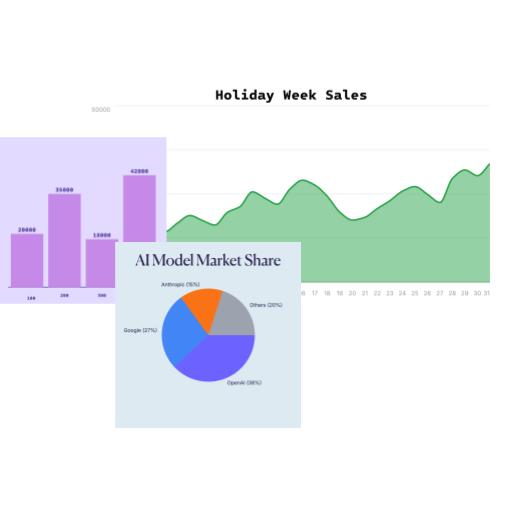
Select a template from our professional collection, add your data by pasting from spreadsheets, and customize colors, fonts, and animations to match your brand. Preview the animation to ensure it looks perfect.
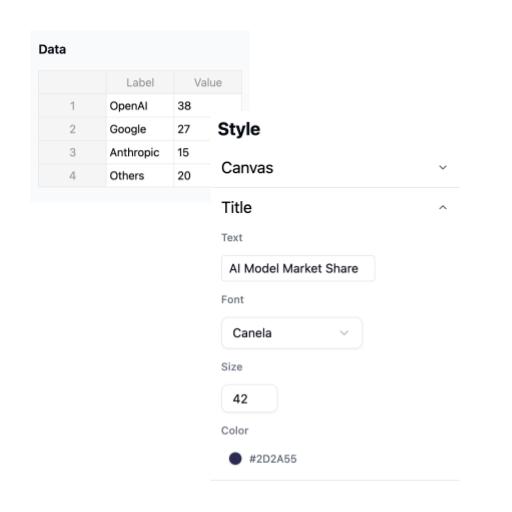
Watch your chart animate in real-time. Adjust animation timing, colors, and layout until everything is exactly right. What you see in the preview is what you'll get in the exported video.
Click the Export button and select "Export Video" (MP4). The encoding happens instantly in your browser using hardware acceleration. No uploads, no server delays—just fast, local processing.
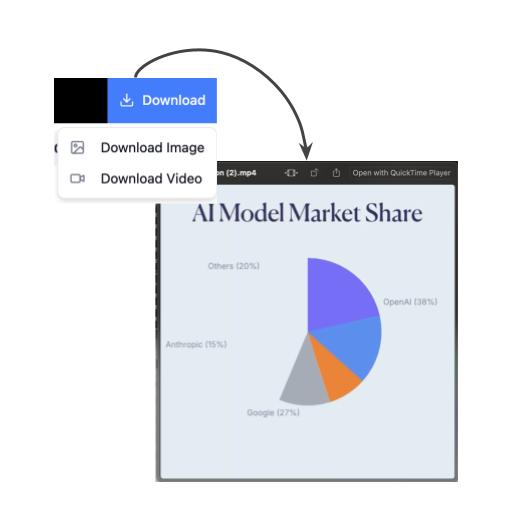
Your HD 1080p video file downloads automatically in seconds. Upload directly to Instagram, TikTok, YouTube, LinkedIn, or drag into PowerPoint. Pro plan exports have no watermarks.
Frequently Asked Questions About Chart Video Export
Start Exporting Professional Chart Videos Today
Join thousands of content creators, marketers, and analysts who use AECharts to export stunning animated charts. Try all features free with image exports, then upgrade to Pro for unlimited HD MP4 video downloads with no watermarks. No credit card required to start.